1Load
Cafe supplies · North Supply Depot
Planned09:42–09:5210 min
First Action
PLAN ACTIONS
See all planned Actions in a dated Calendar. Keep Actions independent or link them with dependencies. Create their details in Add/Edit Action, then review, filter and reuse them from their Action Cards.
Set estimated duration, distance and fuel where relevant. Build each Action’s cost calculation from time, distance and fuel rates, plus fixed additions.
Start your 14-day free trialPlan / 01
Start with Drive, Load, Unload, Fuel and Break. Create your own Action Templates with the fields and colors you choose. Add Custom Fields to any built-in or custom template; fill them in when you create or edit an Action.
01 / ACTION TEMPLATE
02 / ADD / EDIT ACTION
Choose the truck, driver, customer, site and planned time.
03 / CALENDAR ACTION CARD
CM-01 · Niran Chai · Cafe Group
Consignment reference: CAFE-104
One Action to Plan, Track and Analyze.
Example of a built-in template with an added text field. The values are entered on the Action.
Plan / 02
Choose the Action Template, truck, operator, customer and locations. Enter Custom Fields, estimates and rates, and select Guidance. Save the Action to create or update its Calendar Action Card.
Plan / 03
See the plan and tracked result together. Use quick filters and the four commands, or tap the card to open Add/Edit Action.
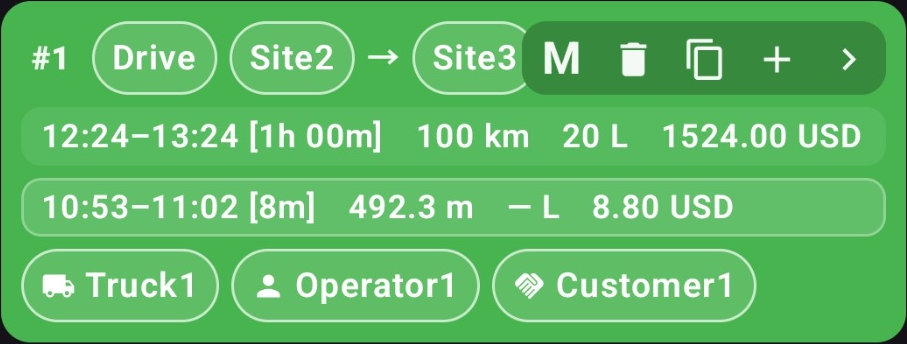
Select a button on the card to see its explanation. Hover or select an explanation to find its control. This demo does not change app data.
To duplicate the full chain, start at its first Action. The duplicate contains fresh planned Actions, without the previous tracked results.
Actual app screenshot with sample records. Values and controls are unchanged; only explanatory highlights are added. Not the Chiang Mai field test or a savings result.
Plan / 04
An Action can stay independent. When one Action should follow another, link its start to the earlier Action’s end. In this three-Action example, extending Load shifts the dependent Drive and Unload without changing their durations.
Each dependent start is linked to the previous finish.
First Action
Starts when Load finishes
Starts when Drive finishes
Original plan: Load 09:42–09:52. Drive follows at 09:52; Unload at 10:04.
Interactive calendar example. Each dependent start follows the previous finish with no gap. Illustrative planned times.
Plan / 05
Copy a single independent Action or include its dependent Actions. Choose the new date and time, then review the plan. The previous tracked results are not copied.
Plan / 06
Find comparable completed Actions. Review the available averages and sample counts before applying an estimate for time, distance or fuel. Set the rates and fixed additions for the Action’s cost calculation.
Plan / 07
Set reminders for scheduled maintenance, insurance renewals and other truck-related dates. Choose a one-off date or a repeating schedule, and review what is due on the truck record.
Illustrative reminder schedules. Manage reminders from the Trucks list.
YOUR NEXT WORKING DAY
Bring your next working day through one connected workflow.
Android app · 14-day trial at every capacity · Eligibility applies